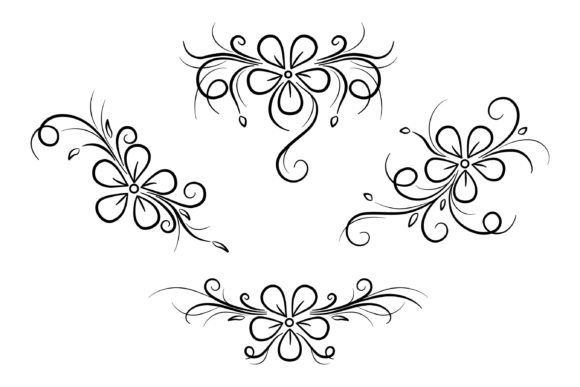
Flowers Swirls and Curls Design Element
Flowers Swirls and Curls Design Element is a versatile vector illustration set that brings an organic, elegant touch to any creative project. Think of it as a digital toolkit filled with decorative floral ornaments, intricate swirls, and graceful curls. Instead of starting from scratch every time you need a border or a frame, this collection provides pre-designed assets that are ready to be scaled, colored, and integrated into your work. Whether you are designing a wedding invitation, a brand logo for a boutique, or a social media banner for a lifestyle blog, these elements serve as the perfect finishing touches that elevate visual appeal without overwhelming the main content.
The core value of this design set lies in its flexibility and professional quality. It is not just a static image; it is a comprehensive package designed to solve common design challenges. The collection includes 4 individual SVG files, allowing you to isolate specific flowers or curl patterns if you only need a corner accent. Additionally, there is 1 combined SVG file containing all the files, which is excellent for quick assembly or when you want to apply effects to the entire group at once. This variety ensures that whether you are a beginner looking for simplicity or a pro needing granular control, the resources are there to support your workflow.
Why Choose Vector Floral Ornaments?
In the world of graphic design, scalability is king. Unlike raster images that become pixelated when enlarged, the Flowers Swirls and Curls Design Element relies on vector technology. This means you can stretch a small flower motif to cover a massive billboard, and it will remain crisp and sharp. The inclusion of EPS (Encapsulated PostScript) and PSD (Photoshop Document) formats further enhances this utility. The EPS file is ideal for print designers who need to send artwork to commercial printers, ensuring color accuracy and precise cutting paths. Meanwhile, the PSD file offers layers, giving you the freedom to edit colors, hide specific elements, or adjust transparency within Adobe Photoshop.
For those working primarily in the digital space, the PNG files are equally valuable. With 4 separate PNG files and 1 combined PNG file, you get high-resolution images with transparent backgrounds. This makes them perfect for web design, where they can be overlaid on websites, email newsletters, or digital cards without requiring complex background removal tools. The set also comes with a standard JPEG file, providing a universal format that can be viewed instantly on any device without specialized software. Having all these formats in one download saves hours of conversion time and ensures compatibility across different platforms.
Practical Applications for Every Creator
The versatility of this design element extends far beyond simple decoration. Here is how different users can leverage these assets in their daily projects:
- Small Business Owners & Entrepreneurs: Use the floral borders to create branded packaging, business cards, or promotional flyers. A subtle curl framing your company name adds a layer of sophistication that communicates quality and attention to detail.
- Bloggers & Marketers: Enhance your online content by using the flowers and swirls as headers or dividers between sections. You can place them around product photos in your e-commerce store to draw the eye and increase engagement.
- Educators & Hobbyists: Create engaging worksheets, certificates, or scrapbook pages. The decorative floral ornament style is timeless and works well for school projects, birthday invitations, or personal journals.
- Freelance Designers: Speed up your production time by incorporating these pre-made elements into client mockups. Instead of drawing every vine by hand, you can drag and drop the SVG files into your layout software and customize the hue to match the client's brand palette.
Getting Started with Your Design
If you are new to using vector illustrations, the process is surprisingly straightforward. Most modern design software, such as Adobe Illustrator, Inkscape, or even Canva, supports SVG files. Simply open the file, select the Flowers Swirls and Curls Design Element, and you will see that each part is grouped logically. You can change the stroke width, fill color, or rotate the angle to fit your specific composition. Because the files are vectors, you can also convert the outlines to shapes if you wish to modify the geometry of the petals or leaves.
When working with the PSD file, you have access to layer styles like drop shadows, glows, or texture overlays. This allows you to make the flat vector art look more realistic or integrate it seamlessly with photography. For example, adding a slight shadow to the swirls can give a 3D effect, making the design pop off a digital card or a printed banner.
Things to Consider Before You Begin
While this asset pack is incredibly useful, there are a few practical points to keep in mind to ensure the best results. First, always check the licensing agreement associated with the download. Some licenses allow for personal use only, while others permit commercial use, meaning you can sell products featuring these designs. Understanding these terms protects both you and the original creator.
Secondly, consider the resolution requirements of your final output. While the SVG and EPS files are infinitely scalable, the PNG and JPEG files have fixed resolutions. If you plan to print large-scale materials, rely on the vector versions rather than the raster ones to avoid blurriness. Finally, think about color consistency. Since the design elements are provided in their default state, you may need to adjust the colors to match your existing brand guidelines. Using the layer groups in the PSD or the fill properties in your vector editor makes this customization easy.
Ultimately, the Flowers Swirls and Curls Design Element is more than just a clipart bundle; it is a foundation for creativity. It removes the technical barrier of drawing complex botanical shapes from scratch, allowing you to focus on the bigger picture of your project. Whether you are crafting a delicate frame for a photo or designing a bold banner for a sale event, these decorative floral ornaments provide the elegance and structure needed to make your visuals stand out. By including multiple file types like SVG, PNG, EPS, JPEG, and PSD, this set ensures that no matter what tools you use or where your design ends up, you have the right asset to bring your vision to life.
Embrace the freedom to experiment. Mix the individual SVG files with your own typography, combine the combined PNG with background textures, or use the EPS version for high-end print runs. The potential applications are limited only by your imagination, making this a smart investment for anyone looking to enhance their design repertoire with professional-grade floral accents.